User Interface
File
Options for managing the Resolume XML mapping file.

Mapping File
Displays the name of the currently loaded mapping file.
Select File
Opens a file browse window that lets you choose which Resolume XML mapping file to choose. Keep in mind that the ONLY xmls you can load are ones created by Resolume to represent advanced mappings! Once the file has been selected, the plugin will attempt to load it. If there are any errors during the process, a warning will show up and inform you and let you view a detailed load report detailing what went wrong.
On successful load:
- the current mapping active in the plugin will be replaced by the one that has been loaded
- The contents of the XML will be stored on the plugin instance to avoid data loss.
- The location of the XML file will be stored for ease of use with the 'Reload file' button.
If the mapping completely failed to load, the current mapping will not be replaced.
Reload File
Tries to reload the XML mapping file from the last location it was loaded from.
Mapping
Contains options for controlling how the input clip will be mapped using the loaded mapping.
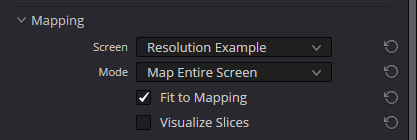
Mode
Lets you choose which mapping mode to use. More information can be found here.
Screen
Lets you pick from the available screens in the mapping.
Slice
Only available in slice mode Lets you pick which slice will be used to map the input clip.
Fit to Mapping
Stretches/squishes the input video so that it maps to the output without any cuts. (More information can be found here)[video-resolutions].
Visualize Slices
Turns on a visualization that lets you see the individual slices being mapped.
Output (Fusion Only)

Output Resolution
Controls the width and height of the output clip. See fusion for more information.
Details
Contains details about the mapping, inputs and outputs.
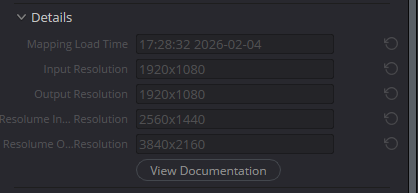
Mapping Load Time
The local time at which the mapping file was last loaded.
Input Resolution
The resolution of the timeline or fusion input.
Output Resolution
The resolution of the timeline or fusion output.
Resolume Input Resolution
The resolution of the Resolume composition that was loaded from the mapping file.
Resolume Output Resolution
The resolution of the Resolume screen that was loaded from the mapping file.
Errors
View Load Errors
Only available when there were errors present when loading the mapping XML. When clicked, opens a report in your browser detailing what went wrong during the load process.